
How TikTok Determines Video Categories
TikTok does not publicly show the category of a video, but it analyzes multiple signals to classify your content:-
Video Content Analysis
TikTok uses AI to analyze visual elements, objects, scenes, and actions in your video. For example, workout movements may signal Fitness & Health, while gameplay footage may indicate Games. -
Audio and Speech Recognition
Spoken words, lyrics, and background music are analyzed. Singing or choreography often places a video under Singing & Dancing, while dialogue-based skits may fall into Comedy or Drama. -
Captions, Hashtags, and Text Overlays
Keywords in captions, hashtags, and on-screen text strongly influence classification. For instance, hashtags like#skincareor#makeuptutorialpush content toward Beauty Care. -
User Interaction Signals
Early engagement plays a key role. If users who frequently watch sports-related content engage with your video, TikTok may classify it under Sports. -
Creator History
Your past content matters. If you consistently post tech reviews, new uploads are more likely to be categorized as Technology.
Common TikTok Content Categories
Below are some common categories TikTok may assign to videos:How to Identify a Video’s Category
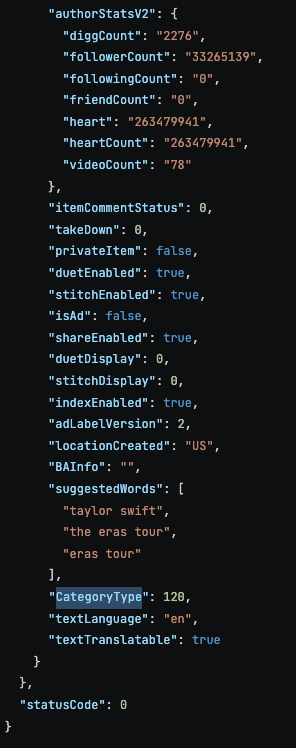
Although TikTok does not show the category directly, you can infer it by using the TikTok API with the Get Post Detail endpoint For example: